Updated appearance of the Personal Account
What was done?
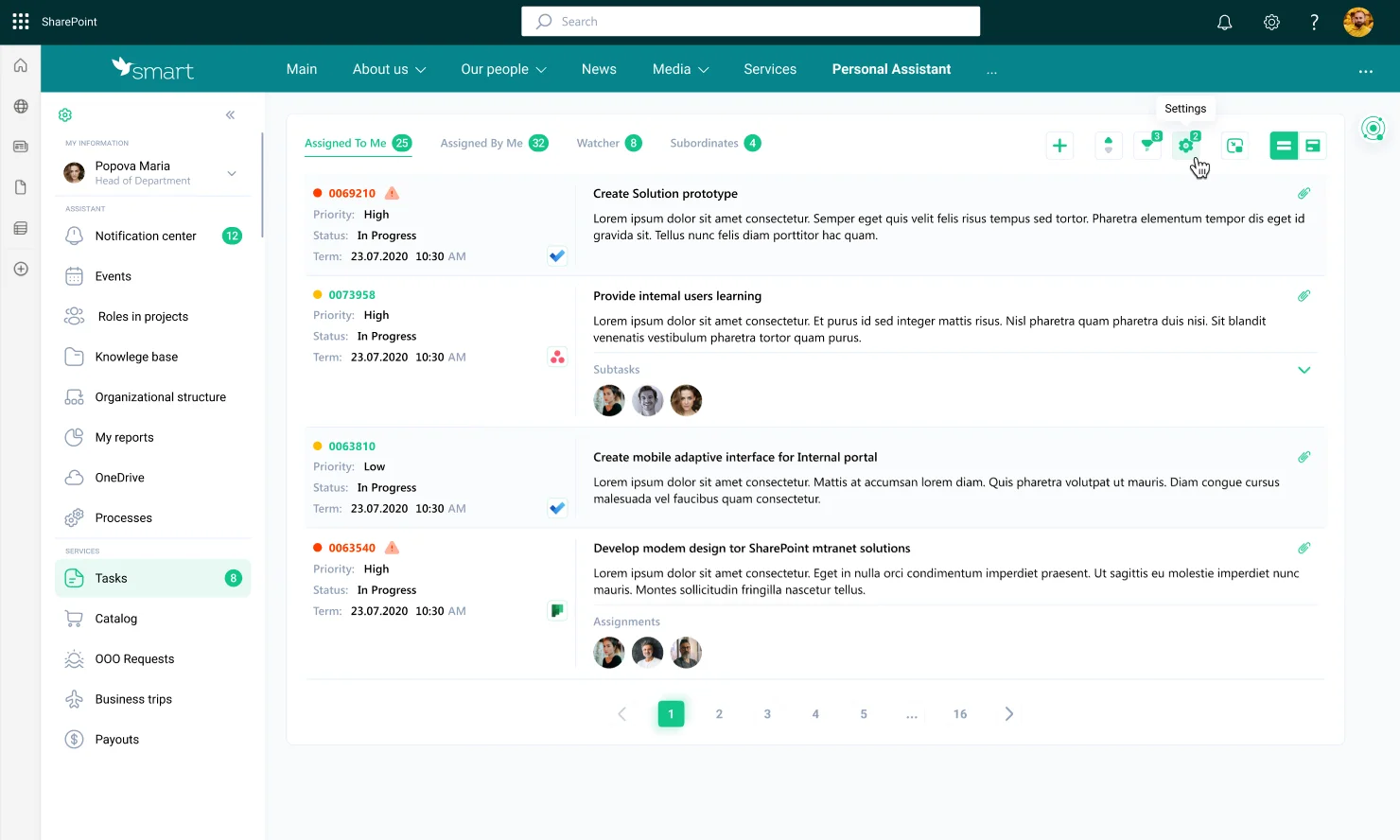
Work was carried out to change the design of the Personal Account, namely:
- the working area of each section of the Personal Account was expanded due to a more compact placement of existing blocks, sections, and elements,
- the navigation location of the Personal Account was changed from the top horizontal to the side vertical,
- the drag-N-drop option was added to personalize available menu items by each user,
- the Notifications section received a more compact view of the message list and vertical scrolling,
- some elements of the “Personal Services” section were renamed to unify the names and further scale them by each customer.
The listed changes were implemented for PC, tablet and mobile versions.
How does it work?
Go to your Personal Account and start using the updated navigation to switch between sections or view unread messages in the “Notifications” block. The increase in workspace is especially noticeable when working through the portal application in Microsoft Teams or through the mobile version of the portal.
Why is it useful?
The updated design has several significant advantages:
- displaying more information even on a small monitor, laptop, smartphone, which significantly optimizes its processing by the user,
- the ability for each user to change the order in which menu items are displayed, providing additional convenience while working,
- the ability for the portal administrator to prepare and configure menus for specific users or groups demonstrates the flexibility of workplace preparation,
- the ability for the portal administrator to prepare and configure menus for specific users or groups demonstrates the flexibility of workplace preparation,
- unification of the names of elements of personal services eliminates the need to rename sections for each customer when planning scaling.
All these changes enhance the versatility of the product’s functionality out of the box.
Optimized loading speed of the organizational structure of employees for large enterprises
What was done?
The operation of the Organizational Structure of employees was optimized, which made it possible to load and display data on a branched tree with user cards three times faster.
Changes were implemented for all versions of SmartPoint Intranet – PC, tablet, mobile.
How does it work?
In your Personal Account, simply go to Organizational Structure of Employees. In a matter of seconds, the data is loaded onto the page and the system will focus on your card, regardless of the size of the organizational structure tree.
Why is it useful?
This is one of the steps to improve the user experience when working in your Personal Account. The work performed allows you to quickly and conveniently view the necessary information from any device.
Updated functional buttons for the Personal Knowledge Base
What was done?
The appearance of the buttons on the Personal Knowledge Base tree building form was updated for the following scenarios:
- creating a new subcategory or link,
- saving the changes made,
- exiting the record editing mode without saving changes.
These changes are available for PC, tablet and mobile versions.
How does it work?
In your Personal Account, go to the Personal Knowledge Base section:
- Open any existing main category for editing, or create a new one.
- Next on the tree editing form, click the button to create a subcategory or link.
- Use the updated Save Changes or Reject Changes buttons.
Why is it useful?
The new button design is intuitive for the user, which simplifies the work when building your own competency center in the Personal Knowledge Base. The update also provides additional benefits when performing scenarios from the mobile version or through the portal app in Microsoft Teams.
Expanding the functionality of the Corporate Library
What was done?
The functionality of the Corporate Library was expanded by adding the following buttons:
- “Open” – to open the selected book in a new browser tab,
- “Download” – to open the selected book in a new browser tab,
These changes are available for PC, tablet and mobile versions.
How does it work?
Go to the page with the Corporate Library and select the desired card, book or any material:
- the “Download” button icon is displayed at the top,
- the “Open” button is displayed at the bottom.
Why is it useful?
This functionality extension will be useful to those companies that seek to create a corporate virtual catalog of books, magazines, and materials, as well as manage the ability of users to download them.
Want to learn more about SmartPoint Intranet? Order a free consultation right now!