


Microsoft SharePoint is a software for building corporate portals, a classic tool for automating business processes, organizing file sharing, and improving internal communication between employees. SharePoint workspace is a basic solution, simple and effective, consisting of ready-made modules, proven by all types of businesses.
According to a Gartner study, Microsoft SharePoint covers a quarter of a million organizations worldwide. And another interesting fact: 85% of the Fortune 500 companies (the top richest companies in the United States) also use SharePoint workspace based on cloud technology. Because it is an intuitively simple but effective solution for building a corporate network.
At SMART business, we provide software integration and support services for Microsoft SharePoint, as well as our own software products based on Microsoft technologies. We will be pleased to tell you the details.
What is the Microsoft SharePoint platform?

Microsoft SharePoint is software used for creating corporate portals. With SharePoint, you can build an internal corporate portal within your organization’s intranet network. The functionality of the platform can be customized to meet the needs of any company: in addition to ready-made sections and solutions, SMART business specialists can handle individual requests and personalize the platform to meet your needs.
It should also be noted that Microsoft SharePoint is closely related to other Microsoft technologies. In this article, we will highlight two key ones.
- Microsoft OneDrive. This is a personal cloud service that organizes the storage and use of files. Microsoft serves the world’s largest companies, provides them with terabytes of cloud space, and simultaneously accesses the storage for thousands of people. A lot of money is invested in encryption, backup, and multi-stage data protection. Microsoft OneDrive is a personal data storage, while Microsoft SharePoint can be used as a corporate data storage. When all work information is stored in the cloud, it increases the level of information protection and provides secure access to all authorized employees.
- Microsoft Teams. The corporate portal created on Microsoft SharePoint is deeply integrated with the Microsoft Teams workspace. All files that you create and organize through Microsoft Teams are stored on your Microsoft SharePoint Server. This is not only about data storage, but also about ready integration with other sites based on SharePoint workspace. To avoid confusing you with explanations, we encourage you to contact SMART business consultants.
What tasks does Microsoft SharePoint solve?
In general terms, Microsoft SharePoint software solves the company’s internal tasks of organizing interaction between employees. The platform provides a single-entry point for users: all records, posts, files, and communication are consolidated on workspaces and departmental websites. In addition, the built-in tools make it possible to implement many corporate ideas. And with engineering customization, you can realize any business need. Below is a closer look at the tasks that SharePoint workspace solves.
Corporate portal
Microsoft SharePoint is the core of a unified corporate ecosystem. If you decide to fully migrate to Microsoft products, you can be sure that you will receive a full set of tools for solving any problem. From an ERP system, employee training system, and electronic document management system to demand forecasting tools, a sales platform, and many other ready-made solutions.
Work time planning and employee management
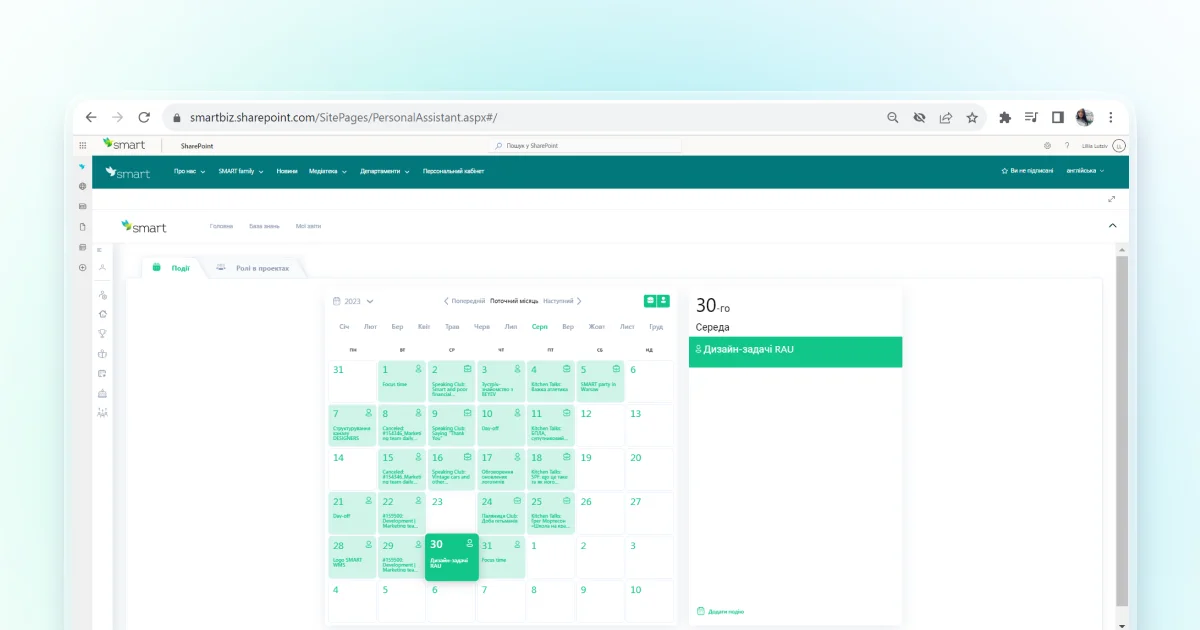
Microsoft SharePoint is integrated with Outlook, Microsoft Planner, To Do and other Office 365 services. Planning and assignment of tasks takes place in Microsoft Planner or To Do, while all notifications and reminders about tasks will be sent to Outlook. Built-in functionality provides notifications about assigned tasks, changes to documents on the portal, and reminders about new corporate news published on Microsoft SharePoint.
Unified communication environment
SharePoint Online is deeply integrated with Microsoft Teams. This is a ready-made communication solution that just needs to be adapted according to the needs and requirements of your organization. SMART business specialists will do this within a short time after the first consultation.
Secure cloud storage
Microsoft SharePoint meets all the security protocols of the global IT giant. Your intranet ecosystem can be protected at the level of the world’s most profitable companies, and SharePoint Online is an inexpensive solution with such benefits.
Development of corporate culture

Of course, it’s also about internal growth: to organize stable informing of colleagues about company events, to plan corporate meetings, and securely store photos and videos from events. This brings employees together and improves communication between teams.
Unfortunately, scaling up a company in many cases leads to employee isolation and fragmentation of their perception. With such issues, people usually can’t understand their wider role in the organization, not only position’s functions. When you have a single Microsoft SharePoint platform that connects colleagues at the company level, you can fill their perception of the organization with the right messages. Of course, this also requires engaging both content managers and administrators because the creation of content for a corporate portal is also labor. At the same time, this is an internal investment, and only unprofitable companies or startups at the early stages can afford to neglect corporate culture.
Licenses and deployment terms
This is an issue that we will consider only in general terms. Previously, we posted specific offers on our pages, but due to the progressive calculation system, there were too many questions about the estimates. The only thing we can say for sure is that it costs nothing to analyze the cost of installing Microsoft SharePoint, so we invite you to a consultation!
Next, let’s look at the types of tariff plans and how they differ from each other.
- Standard SharePoint Online. The lowest price per user per month. Contains all the functions necessary for the company’s work. There are restrictions on the total size of the internal cloud storage, and searching by sections and files is also limited. In this plan, there is also no advanced functionality for limiting file access within Microsoft SharePoint for different employees.
- Advanced SharePoint Online. This plan does not have all the above-mentioned restrictions. Subscriptions are more expensive, but if you connect users with different access levels, the price increases moderately.
- Microsoft SharePoint for the individual needs of the organization. The SMART business team does not strive to sell any specific service or product, we are about business development in general. Therefore, during the consultation, our main task is to satisfy your needs. Our consultants will consider all the possible options for solving the issue. The price depends on many factors: whether it will be only Microsoft SharePoint, or several products at the same time, if developers will need to customize ready-made blocks, etc.
There is also such an option as SmartPoint Intranet, which is our own product developed based on Microsoft SharePoint. Its advantages: it is the same out-of-the-box solution as SharePoint Online, but with much more functionality. We have developed it to meet the needs of medium and large businesses, preserved all the advantages of the basic product, eliminated its disadvantages, and created additional value.
Microsoft SharePoint integration with other programs
The short answer is that the integration options are unlimited. SMART business experts can customize SharePoint Online to fit the needs of any software network. Of course, we have the expertise to know what a real secure intranet system should look like. Therefore, before we start working, we will discuss in detail all the risks and future actions that can be taken to improve the internal ecosystem.
As for Microsoft SharePoint product support, it will last as long as your business exists. Your calls and integration requests will be handled with great attention and accuracy.
Advantages of the Microsoft SharePoint platform
The final section summarizes all the Microsoft SharePoint benefits:
- easy-to-integrate, out-of-the-box solution;
- flexible price depending on the number of people in the company and access levels;
- unlimited options for scaling;
- data encryption and backup, the highest level of protection against hacking;
- all information is stored in the cloud, you do not need to maintain your own servers;
- extended support for Microsoft SharePoint from SMART business team;
- the system is open to further functionality upgrades and customization.
Microsoft SharePoint was first released in 2001, and since then, Microsoft has been releasing updates for the program every month! And it will continue to do so. And we will continue to develop businesses with the help of this software and evolutionary modifications based on its technology, such as SmartPoint Intranet. That’s all for now, thank you for your attention!

